Tuesday, April 15, 2014

New Makerbot Replicator (Fifth Generation): First Print!


I have been wanting a 3D printer for a long time now (I even funded a kickstarter for a Rappidelta 3D printer, which did not work at all and was horrible time consuming exercise in futility). I have finally pulled the trigger and bought the new Fifth Generation Makerbot Replicator. After anxiously waiting seven weeks for delivery (a tad longer than the one week they initially indicated), I came home to find to a gigantic box on my front porch with a Makerbot logo on the front.


To say that I was excited would be a definite understatement. The Makerbot came fully assembled and contained a spool of translucent PLA, some blue tape squares for the build platform, and a smart extruder. The smart extruder is pretty cool - it contains the mechanism which feeds the filament and the hot end which brings it to its melting point and extrudes it onto the platform. The smart extruder attaches to the main system via magnets which pull into the correct orientation. It was super simple to attach and presumably replace if there is ever a problem with the current one.

(image courtesy of makerbot.com)

The PLA spool fits into a compartment at the back of the unit which slides up and down for access. The PLA filament then feeds through a tube which holds it above the system and then into the extruder.

(image courtesy of makerbot.com)

The first thing you want to do is level the build plate (if you already fed filament into the extruder then the system will make you unload it prior to leveling the build plate). The UI on the system is pretty intuitive and is controlled by the knob on the front which you twist to scroll through options and push to select items. There are also two buttons which generally provide 'go back' and 'more options' functionality. The 'level build plate' utility moves the extruder around on the plate and directs you to turn the two knobs on the bottom in various directions until it is level. NOTE: The quickstart instructions tell you to level the build plate and then load the filament. You will DEFINITELY want to run the build plate leveling utility three or four times you first get it as it is way off initially and requires a couple of iterations to really get level. I was not able to successfully start a print job until I did this. Your next step is loading the filament, which the UI walks you through pretty intuitively.
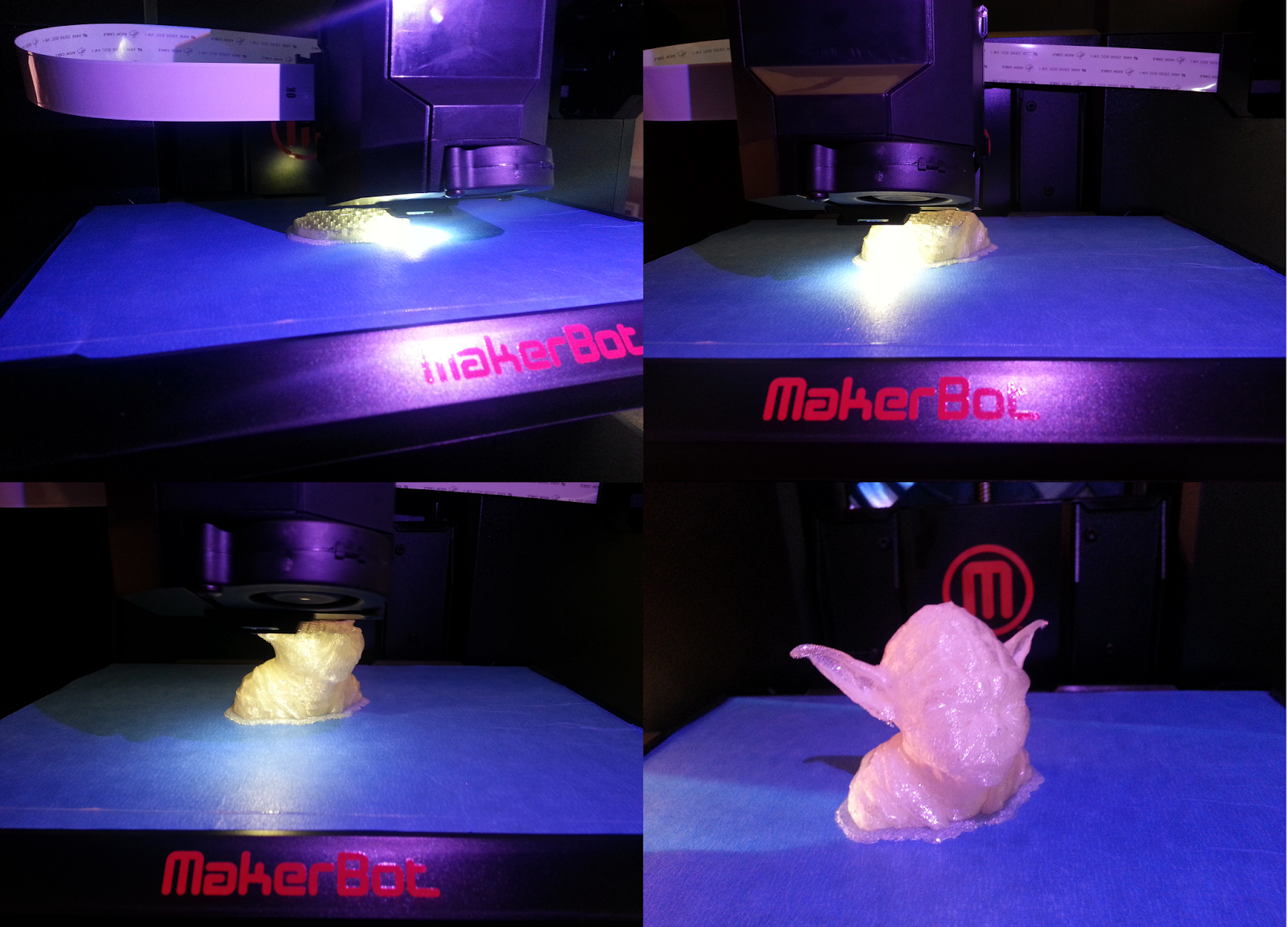

For my first print I downloaded a yoda bust from www.thingiverse.com. The files on the site generally .stl format. The Fifth Generation Replicator comes with the Makerbot Desktop application (a free download from the their site as well) which pull in the files from Thingiverse and convert them into a format that the 3D printer can interpret (.makerbot). From there, you can either save the files to a thumb which plugs into the front of the makerbot, or connect a USB cable from the makerbot to your computer and kick off the print directly from the PC or use an ethernet cable to connect the makerbot to the same LAN as the your PC and do the same. The desktop software is supposed to automatically detect the makerbot, but I have generally needed to type in the IP address in order to find in (IP is displayed in the info section on the makerbot UI). The device is equipped with wifi, but apparently that functionality is coming is a future firmware update.


The print came out pretty well and I was extremely happy with it as a first print. It is a bit tough to see the details with the translucent PLA, so I threw a coat of green spray paint on it and called it a day. The default settings on the Replicator print the object at medium quality on a raft of PLA which helps prevent warping of the object as it prints. You can then just pop the raft off the bottom once the print finishes. It also has the ability to print with supports which hold up the overhanging pieces, but I did not use them on this print and it went extremely well. The supports can be a pain to peal off and leave some residue which needs to be dremeled off afterwards, but they allow to print more complex models.

Since I got the 3D printer I have been printing objects almost constantly - and it awesome. I have had very few failed prints thus some (some minor warping when I tried to do too many objects at once). I have printed the yoda bust, a full sized pistol replica from the Halo series, a Chinese lion, a Tardis lamp, and various Doctor Who cookie cutters (the wife is a HUGE fan). Everything I have printed thus far I have downloaded from Thingiverse. I need to do some cleanup and painting on some of these, but here pictures of everything thus far:


(the weirdly shaped one is a silhouette of David Tennant's head)


The Tardis lamp is probably the coolest finished print so far (but the pistol will give it a run for its money once I get it painted). The Tardis printed as about fifteen different flat pieces which I painted and then assembled. The files also came with image files to use for the signs on the Tardis. Two of the pieces are placed inside and hold the 9 Volt battery and LEDs which are used to the light the unit from within. That build definitely helped soften the blow of the $3,000.00 printer with the wife.


Monday, March 17, 2014

Toy Work Bench for my Son


This build is a little off-topic for me - no video games or overly nerdy themes this time. My son is almost two, so it is about time that he had his own tools and work bench. I thought about buying him a plastic bench, but I thought this would be more appropriate.


I started with a thrift shop TV stand and used some leftover 1" by 2" to make a frame for the pegboard backing.


The next step was to cut a rectangular section out of the middle so that I could make a lift-lid bin for him to store his tools inside. I initially used a small Dremel oscillating cutting tool to cut through the top of the stand. I used that for the left side and the back. It cut fairly straight and evenly, but was extremely slow. I figured a larger reciprocating saw would cut much faster... I was right, but it chewed through the wood and was extremely uneven. That was not a good idea.


Oh well, what is done is done. Apparently I need to pick a smaller sabre saw for this kind of thing. From here I attached a 2" by 4" to the front to create a front barrier for the bin.


I painted the stand, lid, and frame with plastidip to give it a rubberized feel and then attached the pieces together. I used a metal large hinge for the lid. I had thought that I had more than one laying around, but could not find any others. I will add a couple more later for added stability.


Finally, I snapped on some click-bins, attached some pegs to the board, and hung up some of his toy tools.


 The little guy's first order of business was of course to remove all of the tools I had hung up for him and put on his new hardhat.


So far he seems to be a big fan, let's see how long that lasts!

Monday, March 10, 2014

Halo 4 Battle Rifle


I meant post this a long time ago, but I got a bit sidetracked and then forgot. I started out with a NERF RapidStrike and added onto it to make it look more like the Battle Rifle from Halo 4.


The first thing I did was add an extended barrel made from PVC pipe and a metal rod (I don't remember where rod came from). Then I added a NERF scope and used some foam to make an extended top rail. I used more foam to make the large blocky stock and to round out the base of the grip.


Next came a few layers of black plastidip to seal it up and give it a base color (I am sure that this did not look sketchy at all hanging in the middle of my garage with the doors open and facing the street...).


A few layers of silver Rub-N-Buff and it was pretty much complete.


I liked the look of it better without the magazine in place, but I felt like I needed to leave it since it was still capable of firing the NERF rounds.

Obviously it is still a far cry from the game model, but I figured it was passable for a Halloween costume. I still need ideas for next years costume, so please hit me up with suggestions in the comments.


Sunday, November 3, 2013

Halo 4 Master Chief Costume

I decided to try to kick it up a notch for Halloween this year and attempt a Master Chief costume. Unfortunately I waited until the last minute and only had a month to knock it out. It was a bit of a rush job, but overall I am fairly pleased with how it turned out.


The majority of this suit was a scratch build out of anti-fatigue foam mats and craft foam. The craft foam you can find at your local craft store in a few different thicknesses, and the anti-fatigue mats you can generally find at hardware stores. I used two different thicknesses of anti-fatigue mat, one of which was the thicker interlocking type like this, and the other was a thinner type which came in a roll (sorry I cannot find a handy link to the type I picked up - will update later if I find it).


I started with the chest and upper arm, using the thick flooring foam for the base of the arm piece and the craft foam for the raised details. I shaped the arm piece using a heat gun, and then hot glued a curved section of hanger to the back to maintain the curved shape. For the chest piece I cut small sections of the thinner flooring foam and glued each piece together to form the more complex shape of the torso. The base is a leather motorcycle jacket, which was very thick and rigid due the armor pieces embedded within it. This made for a great frame on which to attach the foam pieces.


The arm pieces were hot glued directly to the jacket, but the chest piece is connected via plastic snap buckles that are attached to the jacket by nylon strapping at the top, and velcro strips at the bottom sides. I attached the chest this way so that I could easily remove it if I needed, and because the jacket zips in the front, so it would have been tough to put on at all otherwise. The next step was to build up the shoulders to cover the plastic snaps, and build the cod piece.


The shoulder pieces ended up being much larger than I intended, but I didn't notice until it was too late to change it (goal was to finish by Halloween, and I made the mistake of starting the last week of September). I used more of the nylon straps and plastic buckles to attach the cod piece to the bottom of the chest and underneath to the butt armor on the back. After the mass effect suit I learned that it was important to be able to easily access your important parts for bathroom reasons (that was definitely a complicated trip to the mens room...). Next up came the forearms.


The forearm pieces were essentially just a slightly conical roll of the thin floor mat the length of my forearm, with pieces of craft foam glued on to form the embellishments. Once they were complete, I sprayed on a layer of black plastidip to act as a sealer and primer for the paint. 


At this point I decided to tackle the booster pack on the back. Like the shoulders, these ended up being much larger than I intended, but time constraints kept me from restarting them once I realized it.

I started these by sketching out a template. then building out from there using the foam. I used PVC pipe for the thruster tubes. To mount it on my back, I bent some 3/16 inch steel rods into a hook shape to go over my shoulders underneath the foam shoulder pieces on the jacket and attached that to a sheet of the thick foam. I made a tongue and groove piece out of the foam (which I forgot to take a picture of - will add later if I remember) so that each thruster pack could be removed easily from the frame piece. I did this so that LEDs that I would later mount into the backpack would be easily accessible for changing the batteries and such.


I had intended to build the helmet from scratch using the Pepakura method, but it was taking way too long, and once I got about halfway through the paper craft portion of it I could tell that it was going to be too big for my head. So... I cheated a little bit. I took one of the Halo 3 Legendary Edition game cases that was shaped like a Master Chief helmet (albeit a very small one), I took it apart, dremeled out everything except the outer shell, and hot glued it all back together (with additional spacing between the pieces to make it a bit larger). I also cut out a section of the front visor and glued in a paintball visor inside it so that I could see.

Sorry about the poor picture quality, I did not take a close picture before I painted the helmet. 

At this point it was the week before Halloween and I had a three day business trip coming up for work, so I figured I had better slap some paint on what I had and I could stress about completing the entire lower half in less than a week once I got back from my trip.


I used Rustoleum Oregano for the base color, then dry brushed with black acrylic to age/distress it, then I went over the edges with some silver Rub 'n Buff for wear and damage. I got back from my business trip on Saturday the 26th at one o'clock in the morning and had a Halloween party to go to at five PM the same day. I rushed through the leg portions and just wore the boots from my Mass Effect costume. Unfortunately (or fortunately since the boots didn't look that great), I did not really get any pictures that night of the lower half of the costume. Instead, here is a shot of my to reaction the wife getting a little too friendly with a David Tennant cutout.


After the party I decided to make some better boots. Unfortunately, Master Chief is much taller than I am. Supposedly he is about seven feet tall in his armor, and I am only 5'11'' on a good day. I decided to try to meet him in the middle a build a pair of boots that would add seven inches to my height, making me six and a half feet tall in the armor.


I built the frame out of two by fours, making the length of boot longer than necessary so that it would look as though my foot sat all the down inside it. I made the "toe" portion as a separate piece, and attached it with a hinge on top and rubber band in a groove in the bottom. This gave the boot a more natural looking walking motion as the toe of the boot would flex forward and back down as I walked in it.Some additional foam and paint and they looked halfway decent.


Here is a short video showing the motion of the boots as I moved in them.


That is about it for the Halo 4 Master Chief build. I will do a short post soon going over the Battle Rifle build. Thanks for reading, and let me know what you think in the comments!


Saturday, October 12, 2013

Duct Tape Mannequin Build

I got the idea for this project from The Hero Tutorials youtube video which gives a really nice tutorial on how to make a mannequin out of duct tape which is the same shape as your body. This is very useful when trying to make costumes from scratch.


To start the process you put on some clothes that you do not mind destroying, and then have somebody wrap you in duct tape from neck to ankles. You really want somebody patient who you really trust because this will take quite a while, and you will be completely incapacitated by the end of it. In retrospect, my wife was probably not the best choice...


It is probably a good idea not to wrap the duct tape too tightly. In addition to being really uncomfortable, it can make very difficult and possibly painful to cut yourself out of the duct tape. I learned this the hard way. Scissors did not work very well for me in cutting through the duct tape, but tin snips did fairly well. The wife was kind enough to help cut me out of the duct tape prison, but not quite kind enough to do so without cutting me multiple times. Once she got one of my arms free, I figured I would bleed less if I did  the rest myself.


In her defense, it was really difficult to avoid cutting myself in the process ( I may have bled some from my own efforts as well). Just to reiterate - don't wrap the duct tape too tight, you will probably cut yourself trying to get out of it. Eventually I got the whole suit removed.


Once you have escaped the duct tape suit, you need to build a frame to go inside it so that it can stand up. I would recommend one inch PVC pipe because it is cheap, easy to cut, and all the connectors you need are available at your local hardware store. By the way, it is a lot more convenient to cut if you pick up one of these:


I forgot to take a picture of the PVC frame after I assembled it, so you will have to make do with my terrible MS Paint representation. You will need five T joints and two ninety degree elbow joints to make the frame, or seven T joints if you want to make the arms detachable ( I only did this with one of the arms).

For the dimensions on the frame just measure the width of your shoulders, distance from shoulders to hips, hips to feet, and width your hips, then subtract a bit from each to allow for the size of the joints. Assuming that your shoulders are wider than your hips, you will need to do some adjusting on torso sections of PVC pipe. You can probably just bend the PVC pipe enough to make it fit, or you could use a few 45 degree joints along the way to handle the angles (I just bent the PVC pipe). From there you will just need to put the frame inside the suit, and stuff it full of random crap as you tape it shut to give it form.


I used mostly balled up wrapping paper and grocery store bags to fill the suit. After I built my suit I realized two things that were going to be a pain when using it. One was that I made the hips too wide on the frame and it stretched the torso sideways. This not only looked weird, but would make my measurements off when I was using the mannequin. This was a fairly simple fix, I just cut it back open, pulled apart the frame, and shortened the hip section. The second problem was that the arms were too stiff for me to easily put on and remove shirts and jackets and such. To resolve this I cut off the left arm, switched out the elbow joint for a T joint, put a short section of pipe into the T joint, and added an elbow joint inside the arm to reattach it.


This allowed me to remove the arm when I needed to, as well as swivel it when it was on the mannequin. That is pretty much it on the build. All you need is time, a ton of duct tape, some PVC, some padding, and a patient friend.